
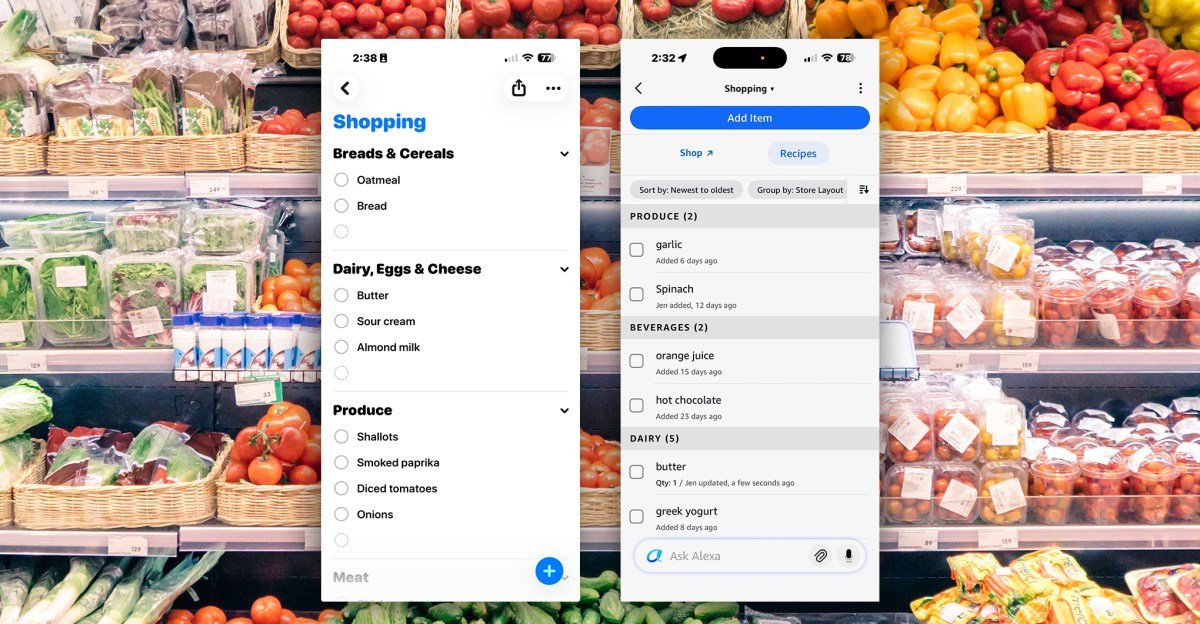
I’ve been using Alexa to manage my shopping list for years. There are tons of great list apps out there, but the convenience of adding items by voice anywhere in my house, pulling up the list on the Echo Show in the kitchen, and having it on my phone via the Alexa app has worked well for me. Until it didn’t.
Alexa Plus, combined with a redesign of the Alexa app that puts the AI-powered generative assistant front and center, made the whole process so annoying that I reluctantly switched to Apple’s Reminders app and Siri.
I didn’t want this. I have Echos all over the house, but only a few HomePods, and Siri insists on saying my name every time I ask her to add something to the list: “Okay, Jennifer, apples are on your list.”
But at least when I pull up the list on my iPhone it’s just a damn list. It’s not an ad for items I don’t want to buy from Whole Foods, or a way to get me to chat with Alexa Plus. Siri is annoying, but at least she stays in her lane.

The listing experience in the Alexa app has been changing in small ways for a while now. First, I started seeing more ads for the aforementioned Whole Foods products. Then I had to tap through two screens to add something. Now a new Alexa chatbot text box appears at the bottom of my list prompting me to ask “Ask Alexa”.
It’s the worst place for it because the instinct is to put what you want to add to your list there. In the Reminders app, that’s where the nice big plus sign is for adding an item. But when I typed “butter” into Alexa Plus, I got the butter wizard.
To actually add something to the list, I have to go to the top of the screen, tap add item, which takes me to a second screen where there’s a page with ads for Whole Foods items, and finally a little text box at the top where I can type whatever I want.
The entire process takes five taps, with the shopping list marked as Favorites so it’s accessible from the app’s front page. Well, it used to be. Now I have to swipe past the new Alexa Plus chatbot tab to get to favorites. So make a total of six taps.


Using the Alexa app widget for iPhone speeds things up a bit, but it still slips me pictures of Whole Foods and Alexa Plus when I just want to make butter on my list. With Apple’s Reminders, it’s usually one tap from opening the app to adding an item to the list.
I asked Amazon about the new Whole Foods product image page, and spokesperson Trang Nguyen told me it was part of a short-term test.
Today, when I opened the list, I still had to click through to the second screen, but instead of large images of mostly Whole Foods products, I was now presented with a longer, more varied list of suggested products with smaller previews.
Nguyen also said the app should remember the tab I was on the last time I used it and open in Favorites by default — like it did before. But none of that changes the fact that the experience has become too clunky, especially compared to adding an item to Reminders.


Of course, the easiest way to add something is by voice (there are no ads), but this is where Alexa Plus still gets in the way. Asking the new, smarter assistant to add something now often involves a whole lot of stupidity – almost like it’s trying to show me how much smarter it is:
Me: Alexa, add sour cream to my shopping list.
Alexa Plus: “Looks like you’ve already stocked up on that creamy goodness! Sour cream is already chilling in your cart.”
Maybe I’m just turning into a curmudgeon who got in her way, but that particular comment really pisses me off.
I repeatedly asked Alexa not to be so talkative, but she did not listen to me, and the sour cream monologue was the last straw. Even though we have an uneasy relationship with Siri — no, I don’t want to ask my iPhone to see some web results again — at least my shopping list is now clean, uncluttered, and ad-free.
The new look of the app is all about Alexa Plus
1/4
The app’s redesign is part of Amazon’s effort to make the generative AI assistant a more general assistant in the vein of ChatGPT and Gemini, rather than just a home assistant.
When Alexa Plus launched last February, Amazon also said it would launch a new Alexa app. While this redesign isn’t it (at least I hope not, as the app is in dire need of an overhaul), it does bring Alexa Plus to the fore.
This week, the company announced that Alexa Plus has left its Early Access phase and is now available to everyone in the US for free through the app and on the new Alexa.com website (where you can also access your shopping list). Premium customers and those who pay $20 a month can also access it on their Echo devices.
The redesign is part of Amazon’s effort to make Alexa Plus a more general AI assistant
Amazon wants you to be able to easily chat with Alexa wherever you are, and the app’s new look is an example of that. The chatbot is in the foreground when you launch the app – the home page is now an Alexa Plus tab pre-populated with prompts based on what it thinks you might need. A smaller chatbot interface then follows you on every page of the app.
When Amazon announced updates to Alexa Plus earlier this week, I asked Daniel Rausch, vice president of Alexa and Echo, about the reason behind the changes to the app. “It’s to bring Alexa to the forefront, to have direct access to Alexa more easily in voice and in text chat,” he said, adding that it’s capable of doing most anything you could want in the app.
“You can tell Alex directly what you want to achieve, say change a setting, and she’ll either change it herself or tell you exactly where to find it,” Rausch said. But apparently it can’t add butter to my shopping list when I type “butter” into the chatbot on the shopping list page.
It’s unclear whether Alexa Plus can be a viable contender against the current players dominating the space. But as Amazon tries to make Alexa Plus happen, some of what’s really useful about Alexa seems to be becoming collateral damage. If he can’t handle something as simple as adding butter to my list without it becoming a monologue—or an ad—something is wrong.
Images by Jennifer Pattison Tuohy/The Verge